Same Bug, Two Languages, Part 1 - Do You See the Threat?
AI just moved into your platform. Now what?
At some point AI stops being a slide in somebody’s strategy deck and becomes a workload on your platform. You have two options: ignore it and hope it goes away, or get curious.
Ignoring it has never worked for anything that ended up in my cluster, so I got curious. And curious, for me, has a specific meaning. When I worked through IT-Grundschutz / ISO27001 for Kubernetes, I did not start with the controls. I started with the question: what nasty things can I do to this?
Same approach here. I take a small test project, look for the lowest-hanging fruit, and try to compromise it. Only then do I open the standards.
Which leads straight to the first problem: do I even know what I am supposed to do/hack?
A quick test: what do you see?
Look at this picture. 
A forest in black and white: leaves, a tree trunk, shadows
Trees. Shadows. Possibly a nice place for a walk. That is me looking at an AI system for the first time: I see a forest, and I know nothing about what lives in it.
Now look at the second one. 
The same forest in color: a dark big cat sits at the foot of the tree
Both pictures: Beau Lotto, Optical illusions show how we see, TED
You spotted the big cat immediately. It was there the whole time, and it was looking at you the whole time. The only thing that changed is the amount of information in the picture: we added color.
That is the job of this series. The threat is already in the system. I am not going to add a big cat, I am going to add color until you cannot unsee it. We keep it straight and simple - we can add complexity later. Learn to walk, then run and then you do your marathon.
The test subject: a boring ticket system
To add color I need something to point the light at. I picked a simple project: a service management system. Tickets come in, somebody works on them, and an LLM helps along the way.
It is deliberately boring. Nobody learns anything from a contrived lab that exists only to be broken. A ticket system is something you already run, or something the team next door is about to “enhance with AI” before the next planning cycle. And yes, it is often the obvious choice to start, with your AI adoption strategy.
It also has the three ingredients that make this interesting:
- It takes text from people you do not control. That is the whole point of a ticket.
- It holds data that is not meant for everybody. - we will discuss if this is a good idea.
- There is a model in the middle that reads the first and can reach the second.
If you have a security background, that list should already make you slightly uncomfortable. Hold that feeling. We will give it a name in a minute.
The plan: break it first, read the standards second
The series runs in two passes over the same attack.
- The technical pass. I pick one easy threat, run it against the ticket system, and try to get confidential data out. No theory before there is something on the screen to argue about.
- The translation pass. With the attack in hand, I go looking for it in regulations and standards. Where does this exact problem show up, and in which words?
The order matters. Read a control without having seen the attack and it is a sentence you nod at. Read it after you watched the data walk out, and you know exactly which line of your design it is talking about.
It is also why the series is called “Same Bug, Two Languages”. Developers and auditors usually describe the same hole. They just do it in vocabularies that do not overlap, in meetings the other side does not attend.
First pick: prompt injection
For the technical pass I need an idea, and the obvious one is the OWASP Top 10 for LLM Applications. I did what any lazy attacker would do and started at the top. (if you think about OWASP Top 10 - yes, but they even have AI flavor lists!)
The first entry is LLM01:2025 Prompt Injection. OWASP describes it as input that changes the model’s behavior or output in ways nobody intended. The first consequence on its list is the disclosure of sensitive information, which happens to be exactly what I am after.
It looks like a viable choice for a low-hanging fruit. There is no exploit code, no memory corruption, no CVE to wait for. The payload is text, and a ticket system is a machine for accepting text from strangers.
OWASP splits the problem in two:
| Variant | Where the malicious text comes from | In ticket-system terms |
|---|---|---|
| Direct | The user’s own prompt | I talk to the assistant and try to talk it out of its instructions |
| Indirect | External content the model processes, such as websites or files | I write a ticket, and the model reads it later on somebody else’s behalf |
The second row is the one that should worry a platform team. The person who triggers the attack never typed anything suspicious. They just opened a ticket.
And we need to talk about jailbreaking
Prompt injection and jailbreaking get used as if they were the same word. OWASP notes this too, and then draws a line: jailbreaking is a form of prompt injection in which the input makes the model drop its safety protocols altogether.
For this series the practical difference is who has to fix it:
- Jailbreaking goes after the model’s own safety rules. According to OWASP, preventing it takes ongoing work on the model’s training and safety mechanisms. That is mostly the model provider’s side of the fence.
- Prompt injection goes after your application: your system prompt, your data, your tools. OWASP places the safeguards in system prompts and input handling. That is your side of the fence.
So a model that refuses to explain how to build a bomb can still hand over your ticket data without blinking. It was never asked to do anything it considers harmful. It was asked, politely, to be helpful with the wrong text.
One honest caveat before anybody gets comfortable: OWASP says it is unclear whether fool-proof prevention of prompt injection exists at all. The mitigations reduce impact. Keep that sentence in mind for the translation pass, because auditors do not love the word “unclear”.
Next up: adding color
That is the scene. A boring ticket system, a model in the middle, and one threat picked from the top of the list.
In the next part I stop describing the forest and go looking for the big cat: the attack itself, against the ticket system, with the goal of getting confidential data out. After that comes the translation into the language of regulations and standards.
Until then, look at your own platform and ask the question from the first picture. Where does text from strangers end up in front of a model that can reach something valuable?
If the answer is “nowhere”, look again. In color.
Hint: the bigger map
Prompt injection is one tree in the forest. If you want to see the whole forest in color, the OWASP AI Exchange has it on a single slide, but remember what I said. We start small and then go big. You get the idea with this picture where it leads to.
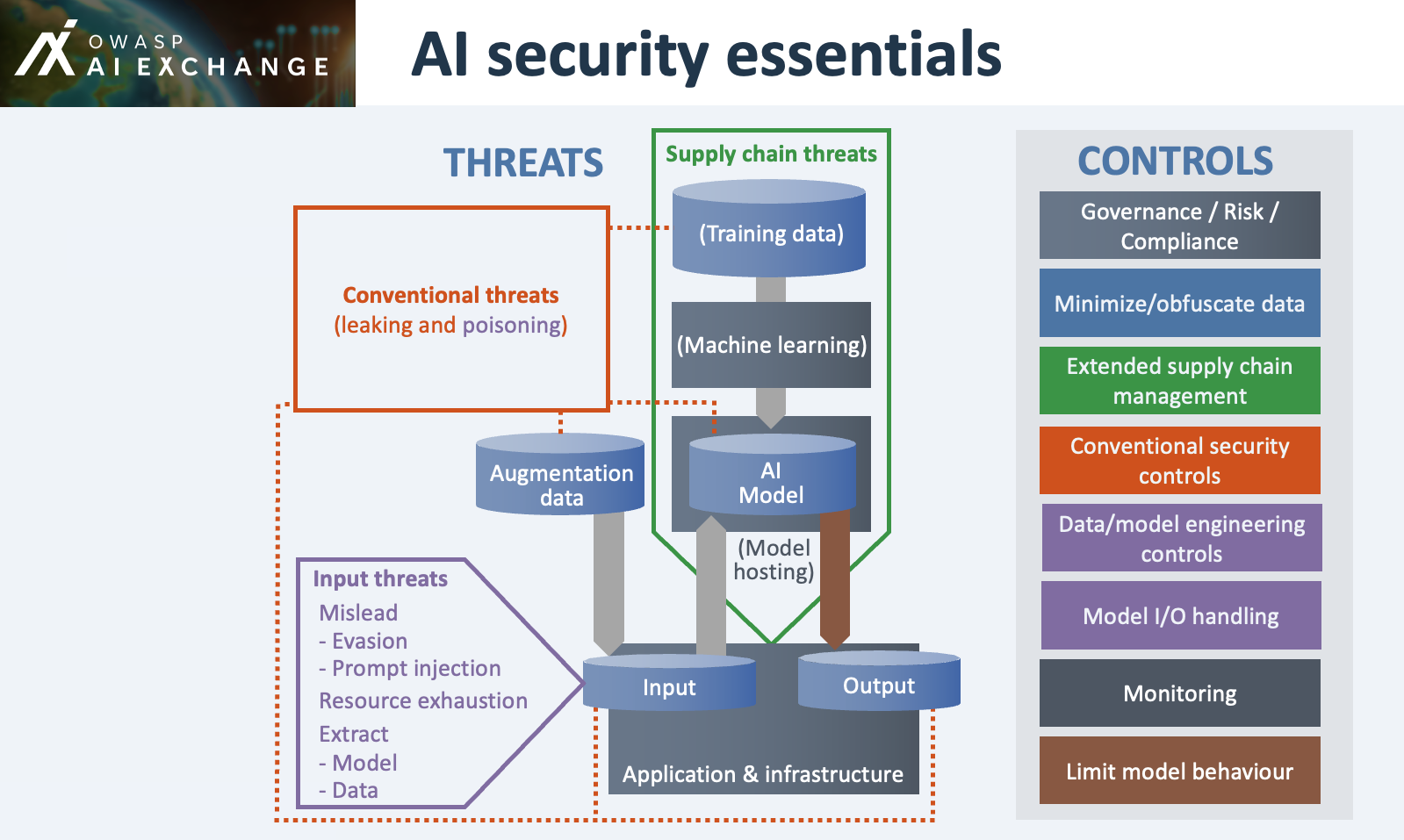 Source: OWASP AI Exchange, AI security essentials
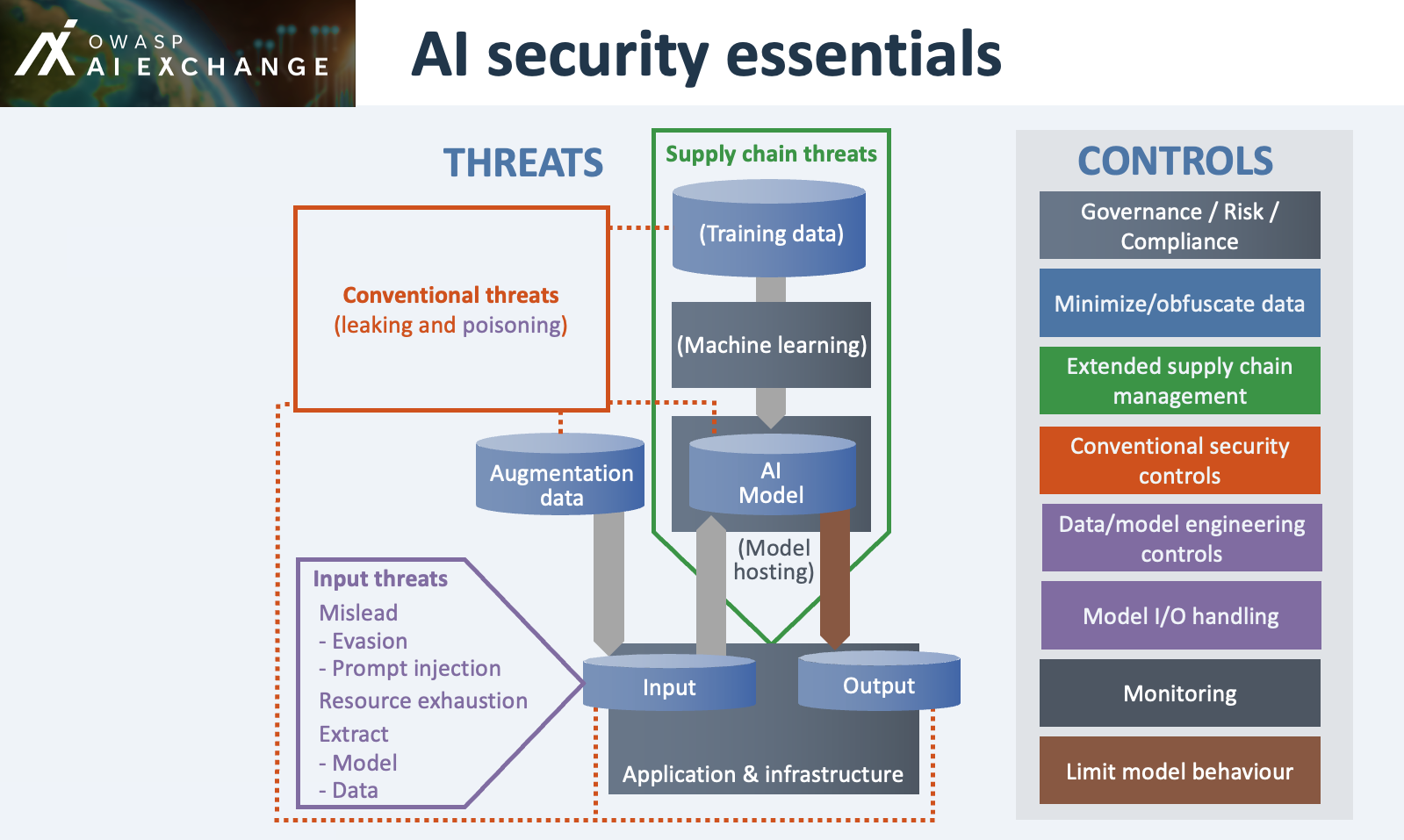
How to read it for this series:
- Left, bottom: our pick. Prompt injection sits under input threats, in the “mislead” group next to evasion. The same box lists what an attacker extracts through the input: model and data.
- Left, top and middle: everything we are not doing yet. Supply chain threats around training data, machine learning and model hosting, plus the conventional threats of leaking and poisoning.
- Right: the controls. The colors match the threat boxes, so the purple input threats point you to data/model engineering controls and model I/O handling.
Keep this picture open in a tab. In the translation pass, every finding from the attack has to land on one of the boxes on the right. In the next post, we will setup the ticket-system with data and try to set some guardrails. There will be source code, I promise.
Sources
- OWASP Top 10 for LLM Applications 2025, OWASP Gen AI Security Project
- LLM01:2025 Prompt Injection, OWASP Gen AI Security Project